Boolean Operations
Combine shapes with Union, Difference, and Intersect — and edit the source shapes non-destructively after combining.
Boolean operations combine two or more shapes into a single profile. Select the shapes you want to combine, then choose an operation from the toolbar.
The Three Operations
Union merges all selected shapes into one outline. Overlapping areas are absorbed into the combined boundary.
Difference subtracts the selected shapes from the first shape you drew. Use it to cut holes or notches from a base profile.
Intersect keeps only the region where the selected shapes overlap. Everything outside the overlap is removed.
Circle Geometry and Centerlines
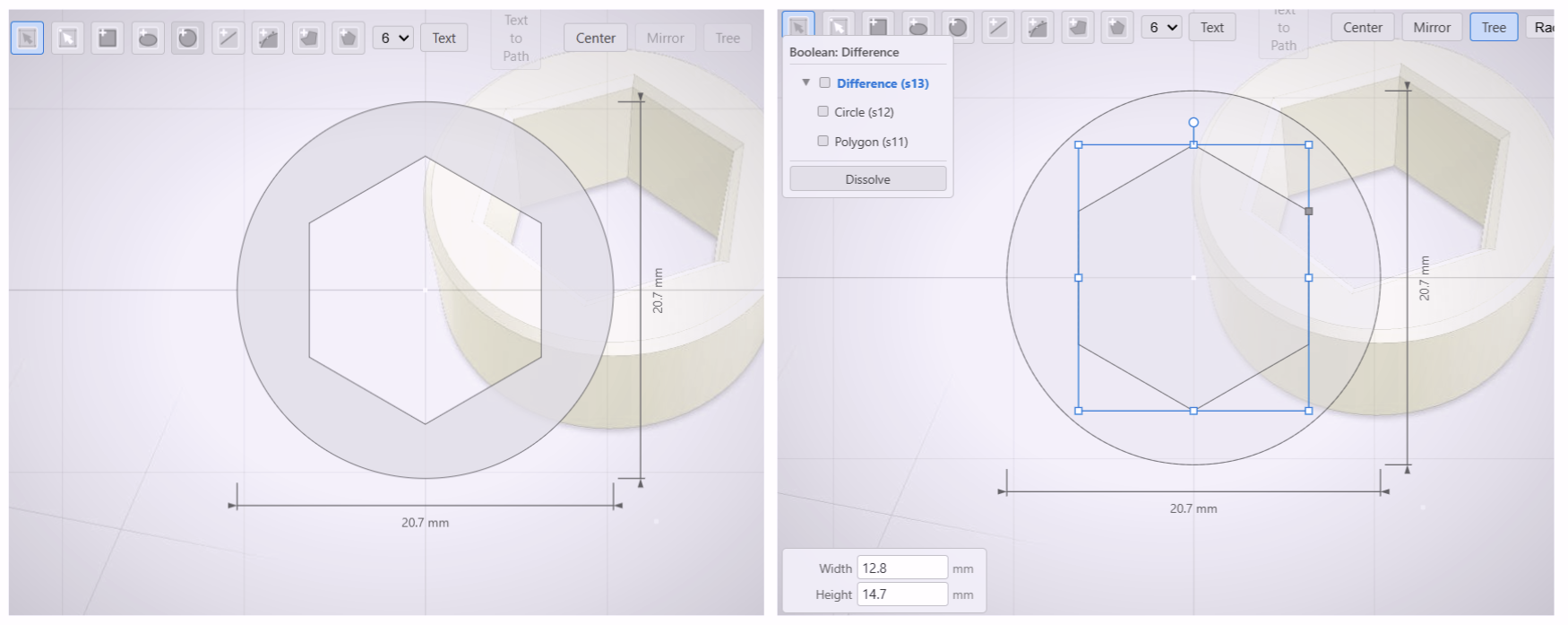
Circles that become holes in a boolean result keep their true arc geometry. They are not converted to cubic curves — the hole in the profile data remains a precise circle. Centerline annotations on circle holes survive through boolean operations, so hole centers stay visible in the result.
Editing with the Boolean Tree
Boolean operations are non-destructive. The source shapes are preserved inside the result and remain editable.
To enter tree edit mode, toggle Tree in the toolbar. A floating panel appears showing the boolean’s component shapes as interactive cards. Select any card to highlight that sub-part on the canvas. Move and resize sub-parts directly — the boolean result re-evaluates after each edit. Press Escape to return to normal editing.
Nested Booleans
A boolean can contain another boolean as a child. In the tree panel, expand a child boolean to see its own sub-parts. You can also double-click a child boolean on the canvas to drill into it directly. Edits at any depth propagate up through the full chain. Breadcrumb navigation at the top of the panel shows your position in the hierarchy.
Managing the Tree
- Dissolve — breaks a boolean apart, returning its source shapes as independent entities.
- Delete a sub-part — removes that shape from the boolean. If only one child remains after deletion, the boolean dissolves automatically.
- Copy/paste — deep-clones the entire tree, including all nested children.