Surface Offset
Inflate or deflate the whole surface of a shape by one signed distance.
Surface Offset moves the whole surface of a shape outward or inward by one distance. A positive distance inflates the shape and a negative distance deflates it. Use it to thicken a wall that prints too thin, or to thin a part that came out too heavy. To hollow a complex shape, copy it, deflate the copy, and cut the copy from the original with Cut.
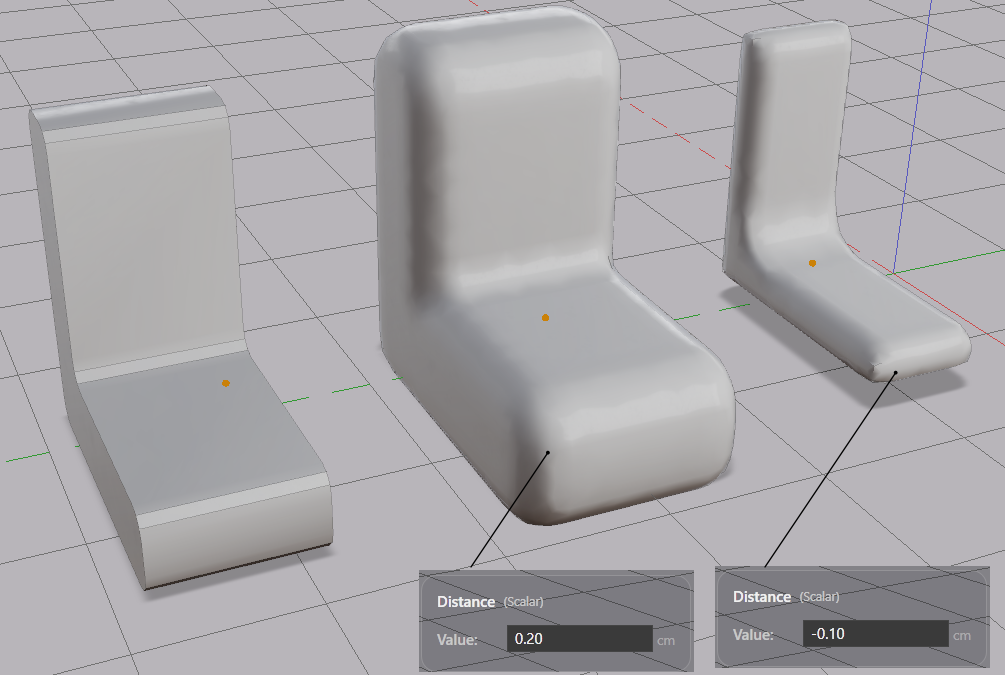
Offsetting a Shape
- Select a shape.
- Click Surface Offset in the toolbar.
The offset part replaces the original. Undo restores the original. The starting distance is one-fifth of the shape’s smallest dimension, capped at 1.0 in the current display unit.
Parameters
| Parameter | What it controls |
|---|---|
| Distance | How far the surface moves. Positive inflates, negative deflates |
Type a value into the Distance field in the Value References panel, or drag the on-screen widget.
Note: An offset too far inward erases the volume. The part then stays in the scene as an outline box. Reduce the distance. The shape returns.