Profile Offset
Move the cross-section away from the rotation axis to create rings, hollow revolves, and centered gaps.
Profile offset shifts the entire cross-section drawing away from the rotation axis before the revolve is computed. The profile’s position in the Drawing Editor stays the same — the offset moves it outward at the point of calculation.
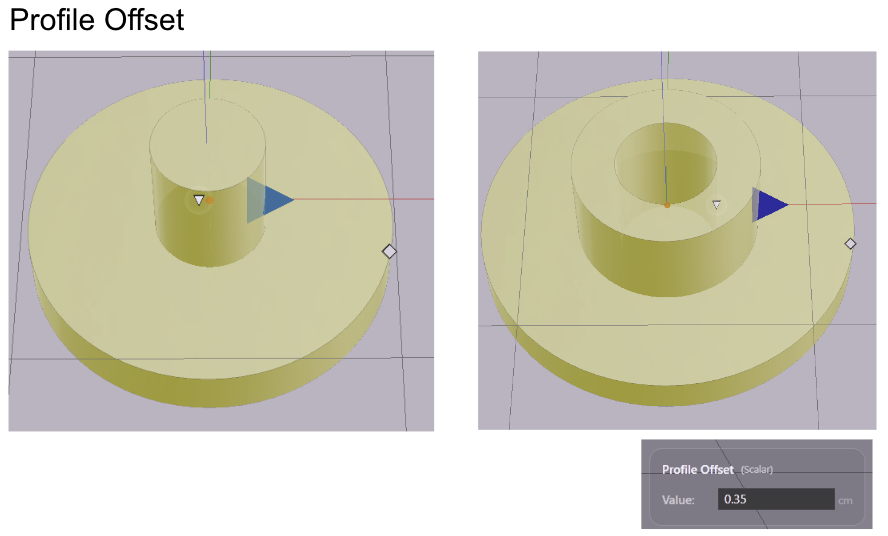
What Profile Offset Does
Without offset, the profile sits as drawn relative to the axis. A profile touching the axis produces a solid center. A profile drawn away from the axis already creates a gap — but that gap is fixed by the drawing.
Profile offset adds a second, independent way to create that gap. It moves the profile outward uniformly, regardless of how it was drawn. The result is a hollow center with a radius equal to the offset value.
This is useful when you want to reuse a profile for different shapes. The same cross-section can produce a solid rod at zero offset, a thin-walled tube at a small offset, or a wide ring at a large offset — without changing the drawing.
When to Use Profile Offset
Rings and ring-shaped solids — a profile that describes a ring’s cross-section becomes a ring of any diameter by adjusting the offset.
Hollow cylinders and tubes — draw the wall profile once, then use offset to place it at different radii.
Avoiding the axis — if your profile accidentally intersects the axis, offset pulls it clear without editing the drawing.
Setting Profile Offset
Select the revolve. In the Value References panel, type a value into the Profile Offset field. The shape updates immediately.
Parameters
| Parameter | What it controls |
|---|---|
| Profile Offset | Distance the cross-section is shifted outward from the rotation axis |
A value of zero means no offset — the profile is used exactly as drawn. Increasing the value pushes the profile further from the axis, enlarging the central gap.