Edge Treatments
Round or chamfer corners on polylines, polygons, and boolean results using Radius, Distance, or Full mode.
Edge treatments let you round corners on polylines, polygons, and boolean results. Three modes give you different ways to control how much rounding is applied at each corner.
The Three Modes
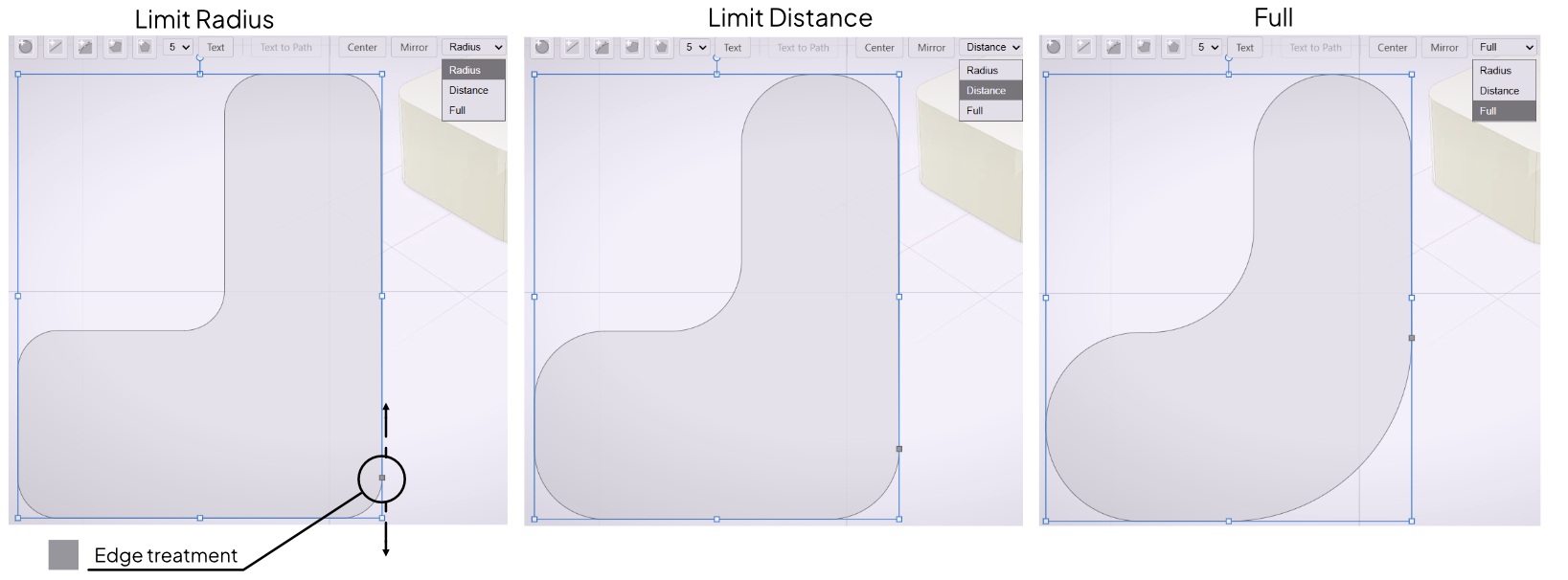
Radius applies the same arc radius to every corner. Sharper corners consume more edge length to achieve that radius, so a large Radius value will visibly shorten the edges leading into tight corners.
Distance applies the same offset distance along each edge at every corner. Because the arc is derived from the edge offset rather than a fixed radius, sharper corners automatically receive smaller arcs. The edge lengths remain more consistent across the shape.
Full applies the maximum possible rounding to each corner given its angle and adjacent edge lengths. Longer edges receive larger arcs; shorter edges stay compact. The distribution is proportional, so the result fills the available geometry without clipping. Full is the default mode.
Adjusting the Treatment
After drawing a shape, a treatment handle appears on the canvas. Drag it to increase or decrease the rounding. Values are clamped automatically to safe ranges — you cannot drag the handle past a value that would cause corners to overlap or edges to collapse.
To change the mode, select it from the toolbar before or after drawing. The current treatment re-evaluates immediately when you switch modes.
Applying Treatments
Edge treatments work on:
- Closed polylines
- Regular polygons
- Boolean results (line-to-line corners in the combined output)
Open polylines do not support treatments — close the path first.