The Six-Axis Direction Widget
Click any sector to direct the selected entity along a world axis — X, Y, or Z in either direction.
The Six-Axis Direction Widget is a compact control that consolidates six orientation actions into one. Click any sector to direct the selected entity along that axis direction.
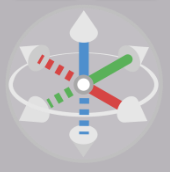
Color Coding
Each axis has a fixed color:
| Color | Axis |
|---|---|
| Red | X |
| Green | Y |
| Blue | Z |
Solid and Dotted Sectors
Each axis has two sectors — one for each direction.
- Solid sector — positive direction
- Dotted sector — negative direction
For example, clicking the solid blue sector directs the selected entity along the positive Z axis — useful for snapping a shape to an upright orientation before positioning. The dotted blue sector directs it along negative Z.
Selection
The widget is active whenever one or more entities are selected. All selected entities are directed together. With nothing selected, the widget is disabled.