Mode and Roll
Choose a smooth spline or straight segments for the path, and twist the profile along it.
Two parameters set the path and the twist along it. Mode sets how the path runs between the points. Roll twists the profile along it.
Mode
| Mode | Path |
|---|---|
| Spline | A smooth curve through every point |
| Straight | Straight segments from point to point |
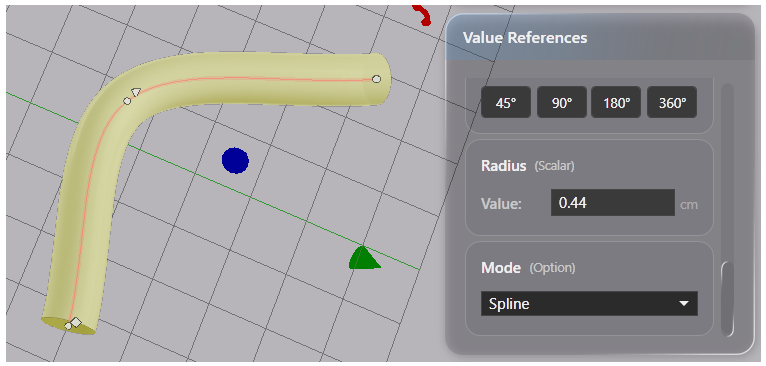
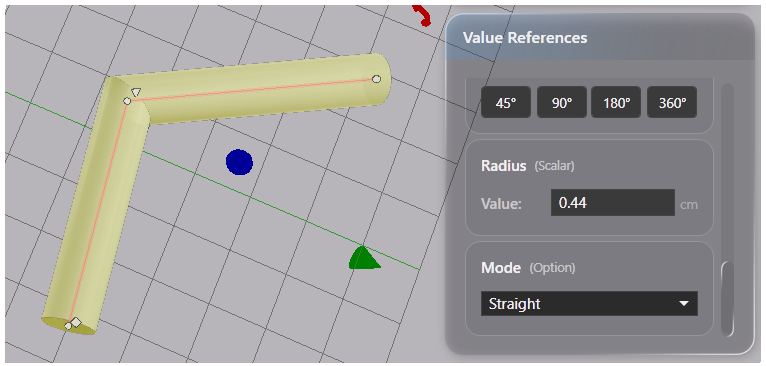
In Straight mode the segments meet in mitered corners. The sides keep their full thickness at a sharp turn.
Roll
Roll twists the profile by a single angle, spread from the first point to the last. Drag the rotation handle at the first point, or type a value into the Roll field in the Value References panel. The value is not wrapped at 360 degrees, so a roll of 450 stays 450 rather than becoming 90.
On-Screen Handles
| Handle | Where | What it changes |
|---|---|---|
| Rotation handle, a white diamond | At the first point | Roll |
| Size handle, a white triangle | At the second point | Radius or Scale |